

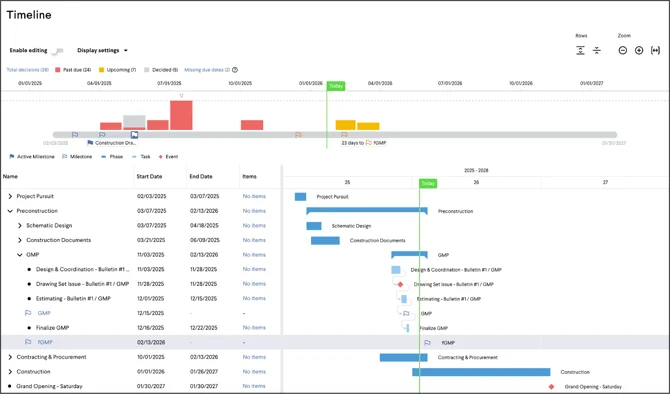
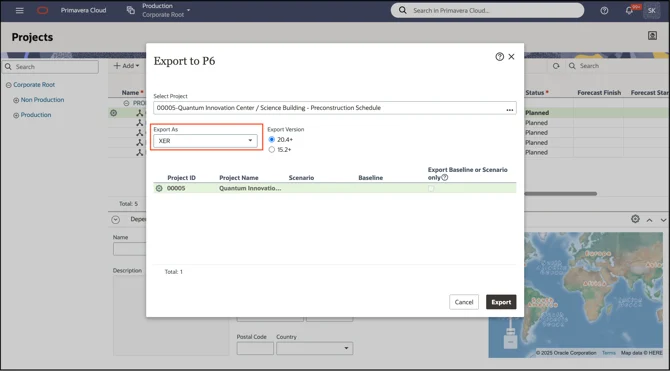
A visually simple timeline for the whole team, informed by the master schedule. Import from Oracle Primavera Cloud or P6 as an .XER export.
Your preconstruction timeline ties straight to the master schedule the rest of the project is already working from. Export from Oracle Primavera Cloud or P6 as an .XER file and Join brings the activities in with names, dates and structure preserved exactly. Imported activities are read-only, which keeps the master schedule under the scheduler’s control, while the precon activities and decision dates your team adds in Join stay editable. Re-importing matches on activity UID, so existing activities update rather than duplicate, and you can bring in only what’s useful — pull construction in as a summary while the detail is still developing, and Join will remember what you left out next time.
What the rest of the project gets is a design phase the whole team can follow. Join presents milestones, decision due dates and procurement packages on one shared set of dates, in a visual timeline that reads clearly on screen and switches to a presentation view for OAC meetings and Big Room sessions. It becomes the thing the team points at when they need to see how design decisions are tracking against the dates that matter. Learn how to import a schedule.
Many other scheduling tools can also export a P6 .XER file, including Phoenix Project Manager and Planera — if yours can, Join can import it.

Let’s build something remarkable.
Together.
All the players. All the pieces. It all comes together with Join.