

A design phase timeline the whole team can read, informed by your master schedule. Import from Microsoft Project.
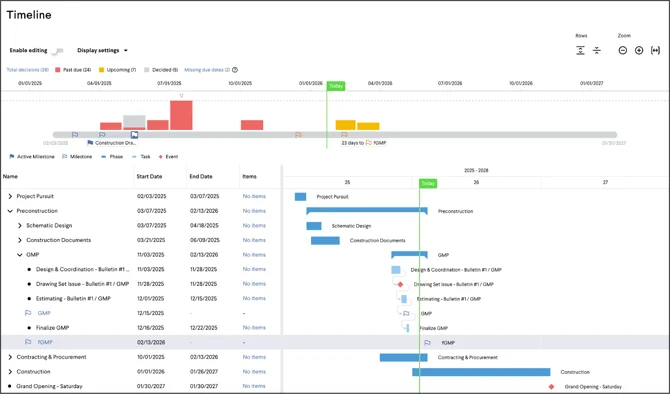
Your preconstruction timeline ties directly to the master schedule. Export from Microsoft Project as an .XML file and Join brings the activities in with the task names, dates and structure exactly as they appear in your scheduling tool. Imported activities are read-only, so the master schedule stays the scheduler’s — and your team can add the precon activities and decision dates that belong to design, which stay editable in Join.
From there it becomes a view the whole team can read. Join lays the design phase out visually — milestones, decision due dates and procurement packages against one set of dates — with a presentation mode built for showing in an OAC or a Big Room. Owners, architects and trade partners can follow it at a glance, so a slip in April is visible to everyone who needs to act on it long before it shows up in October. When the schedule changes, import again: Join matches on activity UID, so existing activities update and new ones are added without duplicating what’s already there. Learn how to import a schedule.


Let’s build something remarkable.
Together.
All the players. All the pieces. It all comes together with Join.